Website Redesign Checklist: SEO, UX, and Performance
A website redesign can improve conversions, speed, and clarity, or quietly destroy your rankings, tracking, and lead flow. The difference comes down to execution. Most redesigns fail not because of design quality, but because SEO, UX, and performance are treated as separate concerns instead of one system.


What is a website redesign checklist?
A website redesign checklist is a step-by-step process for improving your site’s structure, design, speed, and content without losing SEO rankings, analytics data, or conversions.
It helps teams:
protect high-performing pages
preserve or redirect URLs correctly
improve user journeys and content clarity
design for Core Web Vitals and accessibility
validate SEO, tracking, and forms before launch
monitor performance after go-live
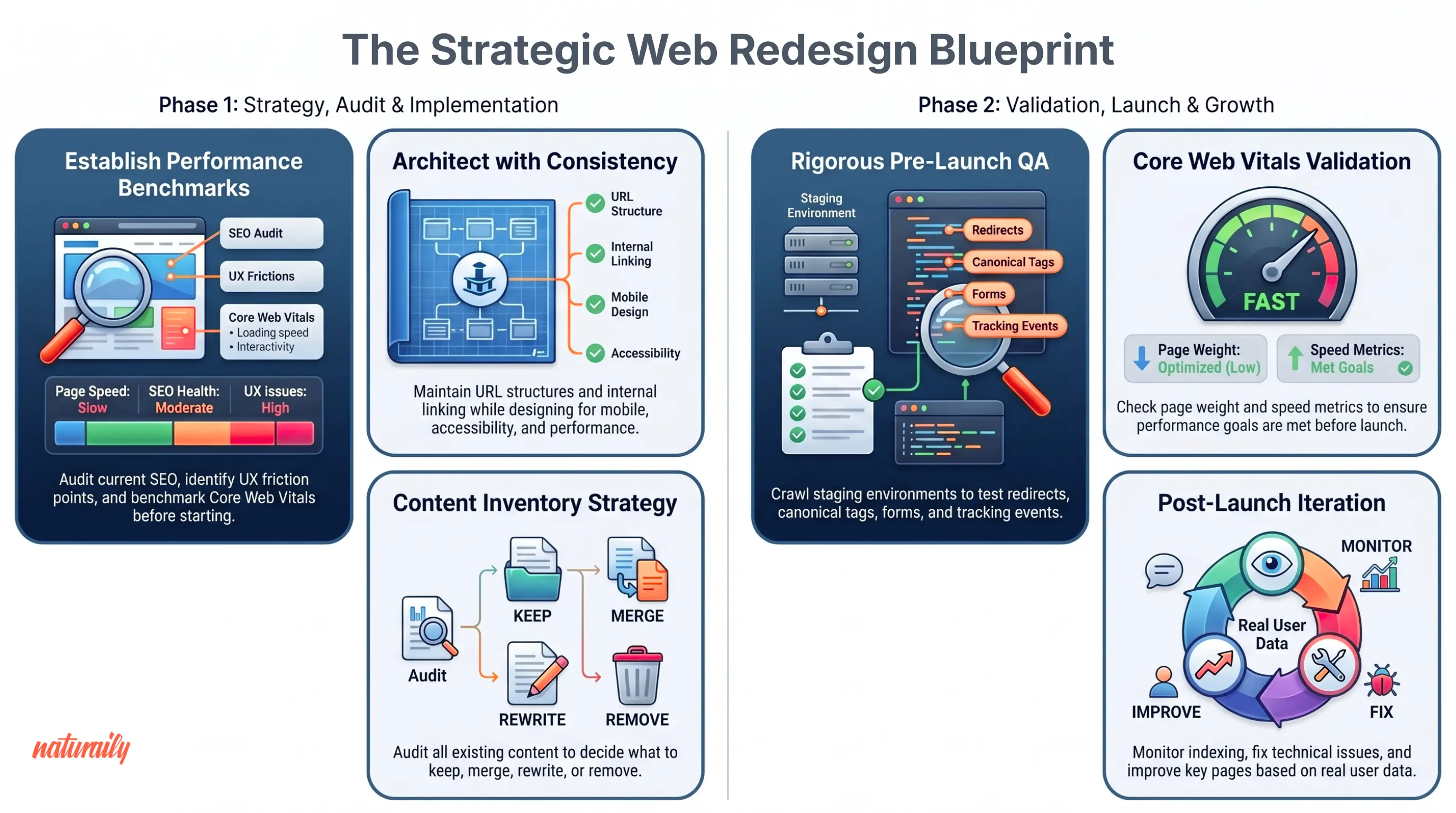
Full website redesign checklist
If you need the short version, focus on these eight steps:
Define redesign goals and page-level KPIs
Audit current SEO performance and top pages
Audit UX friction in key user journeys
Plan content structure, navigation, and URL mapping
Design for performance, accessibility, and clarity
Check whether your CMS supports the new content model
QA SEO, UX, analytics, and performance before launch
Monitor rankings, conversions, and technical issues after launch
Before the redesign (strategy and audit)
Define business and conversion goals
Audit current SEO performance, top pages, and any active seo outreach services
Identify friction points through a UX audit
Benchmark Core Web Vitals and page speed
Inventory content, templates, and page types
Map internal linking structure
Decide what to keep, merge, rewrite, or remove
During the redesign (structure and design)
Redesign information architecture and user flows
Maintain URL structure and metadata consistency
Design for mobile, accessibility, and performance
Validate templates using real content
Preserve analytics and tracking setup
QA redirects, canonicals, schema, and indexing
Before launch (validation)
Crawl staging environment
Test redirects and canonical tags
Validate forms, CTAs, and tracking events
Check Core Web Vitals and page weight
Review navigation and internal linking
Confirm robots.txt, noindex rules, and sitemap
After launch (monitoring and iteration)
Monitor indexing and rankings
Track conversions and engagement
Fix broken links and technical issues
Prioritize improvements on key pages
Iterate based on real user data
Get website redesign implementation support if post-launch fixes, performance work, or template refinements require development capacity.

Plan your website redesign right from the start
Align SEO, UX, and performance before redesign begins to avoid traffic loss and build a site that converts and scales.
Why website redesigns go wrong
Website redesigns usually fail when teams improve the interface but overlook the systems that support search visibility, conversion, and measurement.
Visual direction overrides search and tracking
Pages are redesigned based on aesthetics while existing ranking signals, analytics logic, and conversion paths are ignored. This often leads to traffic loss, weaker intent alignment, and unreliable reporting.
Templates are validated without real content
Placeholder copy hides structural issues. Once real headlines, proof points, and CTAs are added, pages become harder to scan and key information gets pushed too low.
Navigation improves visually but reduces discoverability
A cleaner menu does not automatically mean better UX. If important pages become harder to reach, both users and search engines lose clarity about page importance.
Performance is treated as a development task
Performance issues often start in design: oversized media, heavy components, too many scripts, and unstable layouts all affect Core Web Vitals before development is complete.
CMS decisions ignore how teams actually work
A redesign may look better at launch but quickly lose momentum if the CMS makes updates slow, inconsistent, or dependent on developers.
| Area ignored | What happens | Business impact |
|---|---|---|
| SEO | URLs change without redirects | Traffic and rankings drop |
| UX | Navigation or messaging unclear | Lower conversion rates |
| Performance | Heavier templates | Worse Core Web Vitals, higher bounce |
| Analytics | Tracking breaks | No reliable data post-launch |
| CMS | Content workflow not scalable | Slower marketing execution |
If your redesign includes CMS or architecture changes, follow a proper CMS migration checklist.
Step 1: Define redesign goals and KPIs
The purpose of this step is to define what success looks like before design decisions begin.
Define business outcomes first
Start with measurable outcomes tied to revenue or growth:
increase qualified leads
improve conversion rate on key pages
reduce friction in critical journeys
improve Core Web Vitals and overall performance
enable faster content publishing
Each outcome should have a clear impact on pipeline, revenue, or operational efficiency.
Translate goals into page-level KPIs
High-level goals require page-level metrics.
Define:
organic traffic by page type
conversion rate by template
engagement patterns across journeys
branded vs non-branded traffic
Core Web Vitals per template
Example: If the goal is more qualified leads, measure conversion rate specifically on high-intent pages like pricing, product, or service pages, not just site-wide averages.
Nerdy Banana
Apparel e-commerce
We built a custom product personalization flow that reduced file preparation from 24 hours to 10 seconds and sped up delivery for a growing e-commerce brand.
3x
Quicker delivery times
95%
Production lead time saved
98%
Faster file preparation time

Define success benchmarks before launch
Benchmarks prevent misinterpretation of early results.
30 days after launch: rankings remain stable for top pages, no significant traffic loss, tracking and analytics fully functional
60 days after launch: engagement improves on redesigned templates, Core Web Vitals show measurable improvement, early conversion trends stabilize
90 days after launch: clear uplift in conversion rates, improved performance on key user journeys, stronger alignment between traffic and leads
Align stakeholders on what will not change
Redesign introduces risk primarily through unnecessary changes.
Define:
which URLs remain unchanged
which pages should only be optimized
which content structures already perform well
This protects existing performance while allowing targeted improvements.
Before locking in those decisions, it's also worth understanding what drives redesign cost and timeline — scope choices made at this stage determine whether you're looking at a 6-week refresh or a 6-month replatforming. See our breakdown of website redesign cost and timeline to calibrate expectations before work begins.
Start your website redesign with clear, measurable goals
Define clear goals, KPIs, and constraints before redesign begins to avoid costly mistakes later.
Step 2: Audit SEO before redesign
An SEO audit identifies what must remain stable during redesign. The objective is to preserve ranking signals while improving structure.
Identify high-impact pages
Extract pages that drive visibility and revenue:
top organic landing pages
pages ranking for commercial keywords
pages with strong backlinks
pages generating conversions
These pages need stricter control during redesign because changes to structure, copy, headings, or URLs can affect rankings.
Audit technical SEO foundations
Check whether the current site is technically stable:
crawlability and indexability
canonical tags
redirect chains and errors
sitemap coverage
duplicate or thin content
pagination or faceted navigation issues, if relevant
Preserve ranking signals
Search visibility depends on consistent signals.
Maintain:
title tags and headings aligned with search intent
internal links pointing to key pages
content sections that answer user queries
Rewriting high-performing content without validation can reduce rankings because it disrupts alignment with existing queries.
Review consolidation opportunities
A redesign is also a chance to simplify content architecture. Look for:
multiple pages targeting the same topic
outdated or low-value articles
pages with little traffic and no backlink equity
Decide which pages to:
keep
improve
merge
remove
What happens if you skip this step?
| Skipped action | Immediate issue | Long-term impact |
|---|---|---|
| No page audit | Key pages changed or removed | Traffic loss |
| No redirect map | Broken URLs | Ranking drops |
| No content review | Keyword cannibalization | Weak SEO performance |
| No internal link audit | Poor crawlability | Lower visibility |
Understanding why these issues cause such lasting damage can help you prioritize the audit correctly. See how to redesign a website without losing rankings or leads for the full risk breakdown.
FGS Global
PR agency
Naturaily modernized FGS Global’s website with a new stack that made content management easier, improved search functionality, and created a stronger foundation for growth.
5/5
Clutch review
Custom
search engine
1500+
content items migrated

Step 3: Audit UX and conversion journeys
The goal here is to identify where users struggle, hesitate, or drop off, and understand why.
Map key user journeys
Define the paths that lead to conversion:
homepage to service page
landing page to form
navigation to key content
mobile browsing flows
These journeys reveal where structure supports or blocks user intent.
Identify friction points in those journeys
Analyze where users hesitate or abandon. Look for:
unclear value proposition
competing CTAs
confusing navigation
dense or poorly ordered layouts
high-friction forms
weak proof placement
inconsistent mobile behavior
Validate findings with behavioral data
UX decisions should be grounded in evidence rather than preference.
Combine:
analytics (drop-offs, conversions)
heatmaps (interaction patterns)
session recordings (behavior)
user feedback
Evaluate content clarity and hierarchy
A page can look polished and still underperform if the message is unclear. Check whether:
headings communicate value quickly
sections follow a logical sequence
proof appears near decision points
users can understand the offer without extra interpretation
Check mobile experience separately
Mobile behavior often exposes issues that remain hidden on desktop.
Look for:
important elements placed too low on the page
navigation that requires excessive interaction
forms that are difficult to complete
layout instability or slow loading
Mobile friction has a direct impact on engagement, conversions, and search performance.
What happens if you skip this step?
| Skipped action | Immediate issue | Business impact |
|---|---|---|
| No journey mapping | Key paths unclear | Lower conversion rates |
| No friction analysis | Problems remain hidden | Poor engagement |
| No data validation | Decisions based on assumptions | Ineffective redesign |
| No mobile audit | Mobile UX degraded | Lost traffic and conversions |
Step 4: Plan content structure and navigation
This step defines how content is grouped, prioritized, and maintained over time.
Rebuild the sitemap around user intent
Your sitemap should reflect how users search, compare, and decide. Prioritize:
clear top-level categories
direct access to commercial pages
minimal duplication between sections
labels that match real search language
predictable pathways between informational and conversion pages
Create a content inventory
Every page should have a defined role.
Classify content into:
keep – already aligned with intent and performance
rewrite – valuable but unclear or outdated
merge – overlapping pages targeting the same topic
remove – low-value content with no traffic or links
create – missing pages required for SEO or conversion
Content consolidation improves performance because it concentrates authority and removes internal competition between pages.
Map old URLs to new URLs
URL structure defines how search engines transfer authority.
Define:
which URLs remain unchanged
which are consolidated
which are removed
Then map:
1:1 redirects for high-value pages
many-to-1 redirects for merged content
Incorrect mapping causes ranking loss because search engines cannot associate old signals with new pages.
Protect internal linking
Internal linking helps search engines understand authority and helps users reach priority pages faster. Make sure:
key pages stay close to navigation
supporting content links to commercial pages where appropriate
orphan pages are removed or reconnected
anchor text is clear and useful
What happens if you skip this step?
| Skipped action | Immediate issue | Long-term impact |
|---|---|---|
| No sitemap redesign | Confusing navigation | Lower engagement |
| No content inventory | Duplicate content | Weak SEO performance |
| No URL mapping | Broken structure | Traffic loss |
| No internal linking strategy | Poor crawlability | Reduced visibility |
Turn your content structure into a growth system
Plan your sitemap, content model, and URLs so your redesign improves discoverability and scales with your content.
Step 5: Design for performance, accessibility, and clarity
This step ensures that design choices support Core Web Vitals, accessibility standards, and conversion clarity from the start.
Design for performance from the start
Performance problems usually begin with design decisions. Prioritize:
mobile-first layouts
compressed, responsive images
limited font files and variants
controlled component complexity
stable layouts that reduce CLS
restrained use of third-party scripts and embeds
Design for accessibility
Accessible design improves usability for all users and reduces friction across devices and contexts.
Check:
heading hierarchy for content structure
color contrast for readability
keyboard navigation support
descriptive alt text
visible focus states
properly labeled forms
Accessibility improvements increase conversion because users can navigate and understand content without friction.
Design for clarity and conversion
Content structure influences how quickly users understand value.
Focus on:
headings that communicate value immediately
logical section flow
scannable layouts
concise forms
clear next steps
Example: A service page with dense paragraphs is redesigned into shorter sections with clear headings and supporting proof. Users understand the offer faster because clear headings and structured sections reduce cognitive load and make key information immediately visible.
What happens if you skip this step?
| Skipped action | Immediate issue | Business impact |
|---|---|---|
| No performance constraints | Slower pages | Lower rankings and engagement |
| No accessibility checks | Usability barriers | Reduced conversions |
| No clarity optimization | Hard-to-understand pages | Higher drop-off rates |
For context on which design directions are delivering results in 2026, see web design trends that drive leads, trust, and visibility.
Step 6: Check whether your CMS supports the redesign
A redesign only scales if the CMS supports publishing, reuse, governance, and performance after launch.
Questions to ask
Can marketing publish and update pages without developer support?
Can components be reused across templates?
Can teams manage structured content instead of duplicating content page by page?
Can editors preview changes reliably?
Can the CMS support localization or multi-site growth if needed?
Can integrations be maintained without constant workarounds?
Example: If a simple landing page update requires developer support, the bottleneck is not design-related. It is a CMS limitation that will slow down campaigns and reduce iteration speed after the redesign.
Signs the redesign may require replatforming
You may need more than a redesign if:
publishing is slow and dependent on developers
templates break with small edits
content reuse is poor
governance is inconsistent
integrations are difficult to maintain
performance is limited by the platform
Capitalise
Business finance SaaS
Replatforming unlocked measurable improvements across performance, content operations, and scalability. The new setup delivers faster load times, better SEO visibility, and smoother user journeys, while giving marketing teams full control over content without developer support.
48%
growth in average monthly traffic
31%
faster mobile LCP
35%
faster CMS content update

What happens if you skip this step?
| Skipped action | Immediate issue | Long-term impact |
|---|---|---|
| No CMS evaluation | Publishing friction | Slower content velocity |
| No component reuse | Duplicate work | Inconsistent UX |
| No structured content | Hard to scale pages | SEO and UX degradation |
| No replatform decision | Technical limits persist | Reduced redesign impact |
Step 7: QA the site before launch
The goal is to confirm that the new site works as intended before it impacts traffic, users, and data.
SEO QA
SEO validation ensures that search engines can crawl, understand, and rank the new site correctly from day one.
Check:
redirects are implemented correctly and match the mapping
canonical tags point to the correct versions of pages
metadata (titles, descriptions) is present and aligned with intent
heading structure reflects page hierarchy
internal links point to valid, relevant pages
indexability rules (noindex, robots) are correctly set
XML sitemap includes all important pages
Example: A missing redirect for a high-traffic page results in a 404 error after launch. Rankings drop within days because search engines lose the connection between old and new URLs.
UX QA
UX validation ensures users complete key actions because it verifies that navigation, forms, and CTAs work correctly across devices and scenarios.
Check:
CTAs are visible and clearly prioritized
form flows are simple and functional
navigation works across all states (hover, open, mobile)
mobile usability is consistent across templates
error states provide clear feedback
thank-you pages confirm successful actions and guide next steps
Example: A form submits successfully, but the user receives no confirmation. This creates uncertainty and leads to repeated submissions or drop-offs.
Performance QA
Performance validation ensures that design and development decisions meet speed and stability expectations.
Check:
Core Web Vitals meet acceptable thresholds
images are compressed and properly sized
lazy loading is applied where appropriate
third-party scripts are reviewed and limited
templates are tested under realistic conditions
Performance issues should be fixed before launch because post-launch fixes require rework on live templates and can negatively affect user experience and rankings.
Analytics QA
Analytics validation is critical because broken tracking prevents accurate measurement of conversions, which makes it impossible to evaluate redesign performance.
Check:
GA4 events fire correctly across key actions
form submissions are tracked end-to-end
call tracking works across devices
cookie consent banners do not block essential tracking
attribution flows correctly reflect traffic sources
Example: A redesign launched without validated GA4 events → conversions were not tracked → marketing decisions were delayed due to missing data.
What happens if you skip this step?
| Skipped action | Immediate issue | Business impact |
|---|---|---|
| No SEO QA | Crawl and indexing errors | Traffic loss |
| No UX QA | Broken flows and unclear actions | Lower conversions |
| No performance QA | Slow or unstable pages | Higher bounce rates |
| No analytics QA | Missing or incorrect data | Poor decision-making |
Step 8: Monitor performance after launch
First 72 hours
Validate stability:
crawlability and indexing
redirect accuracy
broken links
analytics tracking
form functionality
Issues at this stage affect visibility immediately.
First 30 days
Evaluate trends:
landing page performance
impressions and clicks
ranking movement
Core Web Vitals
conversion rates
Short-term fluctuations are expected. Focus on patterns.
First 90 days
Measure outcomes:
page-level performance changes
internal linking improvements
content gaps
CRO opportunities
template effectiveness
This is where redesign impact becomes measurable.
What to improve first
Prioritize:
pages that lost rankings
high-intent pages with low conversion
slow templates
high exit pages
Targeted improvements deliver faster impact than broad changes.
Example: A service page retained traffic after redesign but conversion rate declined → analysis showed weaker CTA hierarchy and messaging clarity.
What happens if you skip this step?
| Skipped action | Immediate issue | Business impact |
|---|---|---|
| No early monitoring | Issues go unnoticed | Traffic and conversion loss |
| No performance tracking | No clear benchmarks | Slow optimization |
| No prioritization | Random fixes | Limited impact |
| No iteration | Static site | Declining performance over time |
Plan a website redesign that improves SEO, UX, and conversions
A website redesign delivers results only when SEO, UX, performance, and content structure are treated as one system.
To reduce risk and improve outcomes:
protect what already works
redesign around real user journeys
preserve SEO signals and internal linking
validate everything before launch
monitor results and iterate after go-live
Naturaily supports end-to-end website redesigns, from UX audit and information architecture to design, development, and post-launch optimization. The focus is on measurable outcomes: stable rankings, faster pages, and higher conversion rates. Let’s talk.
FAQ
Website redesign explained
Preserve high-value URLs, implement a complete 301 redirect map, keep metadata aligned with search intent, and maintain internal linking to key pages. Validate indexability, canonicals, and sitemaps before launch, then monitor rankings and traffic immediately after.
A complete checklist covers: SEO audit, UX audit, content inventory, information architecture planning, URL mapping, performance optimization, CMS evaluation, pre-launch QA (SEO, UX, analytics), and post-launch monitoring.
SEO should be integrated before, during, and after the redesign. It starts with a baseline audit, guides structure and content decisions during the process, and continues with monitoring and optimization after launch.
UX affects how easily users navigate and convert, while performance affects both user engagement and search rankings. Poor UX reduces conversions; slow pages increase bounce rates and lower visibility in search results.
Only if the current CMS limits content workflows, scalability, or performance. If marketing cannot publish independently, reuse components, or manage structured content, replatforming should be considered alongside redesign.
Most redesigns take between 2 and 6 months. Timeline depends on scope, number of templates, content complexity, and whether replatforming or integrations are involved.
Plan your website redesign with Naturaily
A successful redesign requires more than design execution. It requires alignment between strategy, UX, SEO, and technology from the start.