Core Web Vitals: How Optimizing Site Speed Can Boost Traffic & Sales
Core Web Vitals optimization helps businesses improve website speed, user experience, search visibility, and conversion rates. If your website isn't ranking as well as competitors or converting visitors into customers despite ongoing SEO and marketing efforts, poor website performance may be part of the problem.


Updated on June 8, 2026
TL;DR
Core Web Vitals are official Google ranking factors and directly affect SEO, user experience, and conversions.
Even a 1-second delay can cut conversions by ~4.4% and cost businesses thousands in lost annual revenue.
67% of businesses report revenue loss due to poor performance; 53% of mobile users abandon sites loading longer than 3 seconds.
Mobile shoppers are especially sensitive to delays, making optimization critical across all devices.
You can improve LCP, INP, and CLS with targeted fixes, and when those reach their limit, modern frameworks like Next.js, Shopify Hydrogen, or headless commerce ensure future-proof performance and scalability.
Google now treats Core Web Vitals as a ranking factor, but their impact goes far beyond SEO. They directly influence site speed, user experience, and ultimately your conversions and sales. Studies show that even a one-second delay in page load can lead to a significant drop in conversions, especially for e-commerce.
If you’re serious about staying ahead, you need to understand not just what Core Web Vitals are, but also why they matter for your business growth. While CWVs are crucial, they’re not the only factors driving rankings and conversions. For a deeper understanding, read our detailed guide: Modern website optimization for business growth.
What Are Core Web Vitals?
They’re Google’s way of measuring the quality of a website’s speed, interactivity, and visual stability. These metrics reflect how real users experience your site.
Here are the three main ones to know:
Largest Contentful Paint (LCP). Measures how fast the main content of a page loads. If your hero image or key product photo takes too long to appear, users may leave before they even start browsing.
Interaction to Next Paint (INP). Measures how long it takes from when a user interacts (click, tap, or keypress) until the browser presents the next frame reflecting that interaction (i.e. the visual feedback).
Cumulative Layout Shift (CLS). Measures visual stability. You’ve probably experienced a page where the button you were about to click suddenly moves because something else loaded on top of it – that’s what CLS tracks.
Google introduced these metrics because they directly affect user experience, SEO rankings, and conversions. A fast, stable, and responsive website is more enjoyable to use, keeps people engaged, and makes it easier for them to complete purchases.
Why Does Google Care About UX Metrics?
Google’s mission has always been to provide users with the most relevant and useful results. In this case, “useful” means a site that is fast, easy to navigate, and free from unnecessary frustration. This is where Core Web Vitals and SEO rankings come together.
Imagine two websites with equally strong content. One loads quickly, stays stable, and responds immediately to clicks. The other is slow, shifts around as ads appear, and leaves you waiting when you try to interact.
Most people will stay on the first site and abandon the second. Google recognizes this behavior, which is why Core Web Vitals SEO impact became a ranking factor. Strong user experience metrics directly influence search visibility.

Marcin Sulikowski
co-CEO, Naturaily
Google encourages businesses to build sites people genuinely enjoy, aiming to make every visit from search results smooth and satisfying.

Core Web Vitals are key to growth
Google rewards fast, stable, and responsive websites. Make sure yours drives visibility and revenue.
The impact is even greater in e-commerce. A product page that takes too long to load or a “Buy now” button that moves just as the customer tries to click it can instantly cost you a sale. Paying attention to Core Web Vitals optimization improves visibility in search results and your ability to convert visitors into customers.
Now, let’s dive deeper.
Why Exactly Core Web Vitals Matter for Business?
For business owners, the most important question is simple: do Core Web Vitals actually affect sales and traffic? The short answer is yes. Google has made it clear that these metrics are part of ranking factors, which means a site that performs well has a higher chance of showing up above competitors. That alone can lead to more visitors.
The real impact, however, goes beyond SEO rankings. Studies have shown that:
0%
of businesses report lost revenue due to poor website performance,
with the average business losing $20,172 annually

Source
Liquid WebFor every additional second of load time between 0-5 seconds, conversion rates drop by an average of 4.42%. This translates to significant annual losses: if an e-commerce site generates $500 daily in sales, the 7% conversion loss from a one-second delay represents nearly $13,000 in lost annual revenue.
Core Web Vitals Case Studies
How n8n Boosted CWVs and Traffic (SaaS industry)
When n8n realized their static website was holding back SEO growth and user experience, they turned to us for help. The old setup struggled with slow performance, manual SEO management, and an inability to scale content effectively.
We rebuilt the infrastructure with a Nuxt-based hybrid rendering approach, optimized caching, and automated technical SEO. The result was a site that loaded faster, responded smoothly, and delivered stable page layouts across devices. In other words, their Core Web Vitals optimization was brought to the highest standard.
The numbers speak for themselves:
100 Core Web Vitals score across all key metrics
300% increase in monthly organic traffic in just two years
900% more Top 10 keywords within a single year
Capacity to dynamically generate 300,000+ pages for SEO-driven growth
How Nanobebe Improved CWVs with Next.js Headless Shopify
Nanobebe needed a faster and more flexible platform to support their rapid growth. Their old Shopify Liquid store was slowing down performance and limiting customer experience. We guided them through a transition to a headless commerce architecture with Next.js and Storyblok CMS, focusing on speed, scalability, and user experience.
The new site achieved an 80%+ reduction in Total Blocking Time, a 117% increase in GTmetrix Performance Score, and cut over 10 seconds from Fully Loaded Time.
These improvements to Core Web Vitals created a smoother shopping journey, so Nanobebe could confidently launch new products and scale their e-commerce business.

Keegan Robbins
VP, Sales & Marketing at Nanobebe
Moving away from Liquid was a big step for us. We were concerned about disrupting our business, but Naturaily laid out a clear plan. They understood the complexities of Shopify and how to transition to a headless setup smoothly.
See how Core Web Vitals can multiply your traffic and sales
Just like n8n and Nanobebe, you can achieve faster load times, higher rankings, and measurable business growth with a performance-first build.
How to Check Your Current Core Web Vitals Score
The first step toward improving performance is knowing where you stand. Google provides free tools that make it easy to check your Core Web Vitals optimization status.
You can start with PageSpeed Insights, which shows how your site performs on both mobile and desktop and gives detailed results for LCP, INP, and CLS introduced earlier in this article.
For a broader view, use Google Search Console, which collects real-world data from visitors and shows whether your pages pass or fail Core Web Vitals assessments. Another option is Lighthouse, available in Chrome DevTools, which lets you run quick tests and receive recommendations.
Checking your scores is only the beginning. To get the most out of these insights, compare your results with competitors in your niche and track how your numbers change over time. Consistent monitoring will show you if your efforts are improving Core Web Vitals SEO impact and help you understand which fixes lead to better rankings and stronger conversions.
What's a Good Score vs Failing Score?
Google sets clear thresholds to help business owners understand where their websites stand. Each metric falls into one of three categories: good, needs improvement, or poor.
| Metric | Good | Needs improvement | Poor |
|---|---|---|---|
| Largest Contentful Paint (LCP) | ≤ 2.5s | 2.5s – 4s | > 4s |
| Interaction to Next Paint (INP) | ≤ 200ms | 200ms – 500ms | > 500ms |
| Cumulative Layout Shift (CLS) | ≤ 0.1 | 0.1 – 0.25 | > 0.25 |
Tip: If your site falls into the poor range for any metric, fixing it should be a top priority. Even moving from poor to “needs improvement” can bring visible gains in SEO visibility and conversions.
Reaching the “good” range takes those improvements even further. It is more than a technical milestone because it creates a smoother experience for visitors, which often leads to higher engagement, stronger trust, and more conversions.
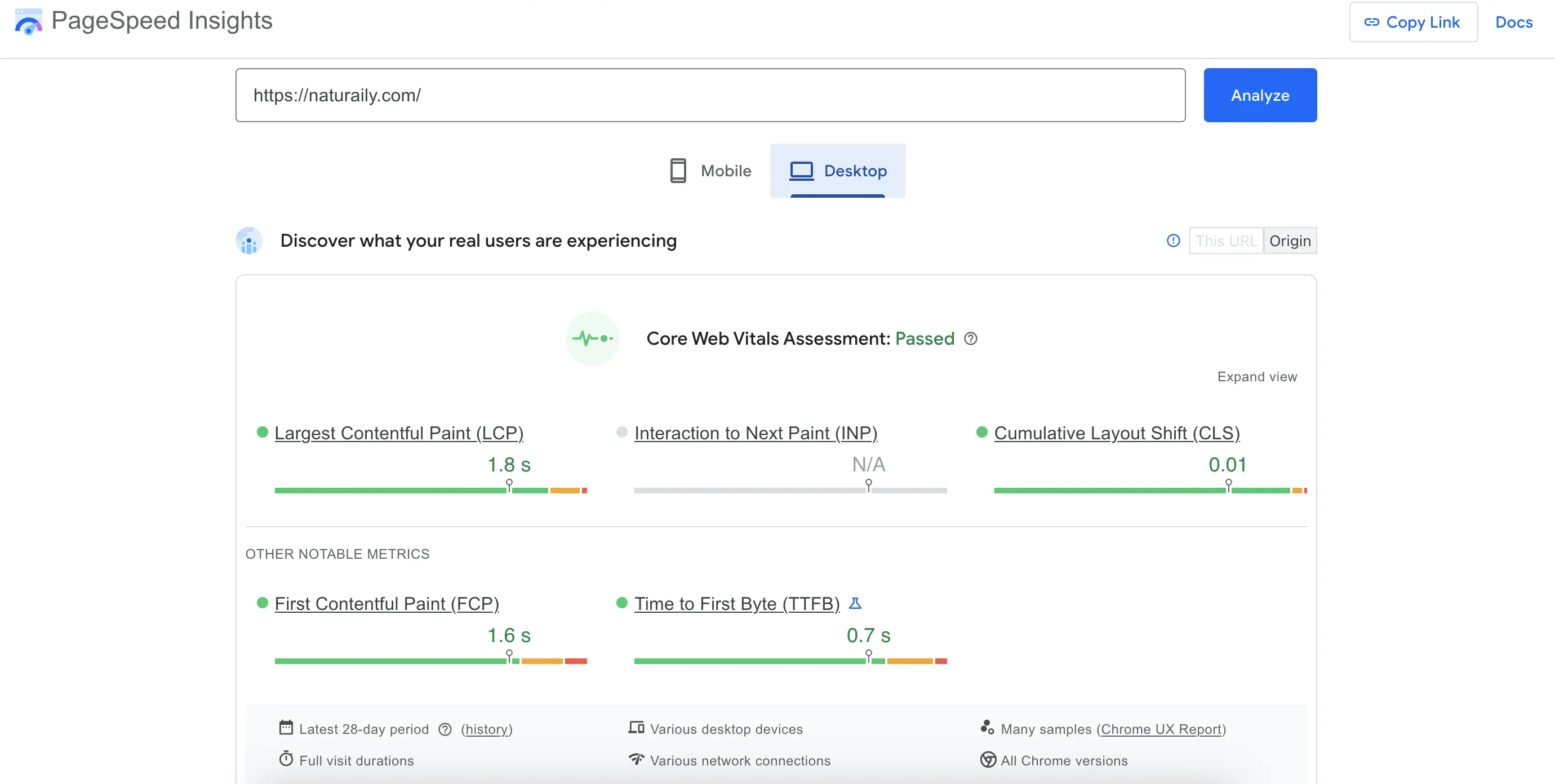
Good score example: Naturaily’s website
Why Is My Website Slow?
Before you can fix your Core Web Vitals, you need to know what is dragging them down. When a site loads too slowly, the cause almost always traces back to a handful of recurring problems. Here are the most common reasons a website feels slow:
Heavy or unoptimized JavaScript. Large bundles and long-running scripts block the main thread, which delays interactivity and hurts INP.
Large, uncompressed images. Oversized hero images and product photos are the most frequent cause of poor LCP.
Too many third-party scripts. Analytics, chat widgets, ad tags, and marketing pixels each add weight and requests that slow the page down.
Underpowered or poorly configured hosting. A slow server response time (TTFB) delays everything that follows.
Legacy CMS and theme limitations. Older platforms and bloated themes ship code you do not need and cannot easily remove.
Inefficient frontend architecture. A frontend that renders everything on the client, with no caching or rendering strategy, struggles to stay fast as the site grows.
If you have already addressed these basics and your site still fails Core Web Vitals, the bottleneck is usually the underlying architecture. We cover what to do in that case further down, in the section on optimization versus redesign.
How to Improve Core Web Vitals
Once you know where you stand and what is slowing you down, you can target each metric directly. Here is how to improve, fix, and pass each Core Web Vital.
How to improve Largest Contentful Paint (LCP)
LCP is about getting your main content on screen quickly. To improve it:
Compress and correctly size your largest images, and serve them in modern formats like WebP or AVIF.
Deliver assets through a CDN so users load them from a nearby server.
Reduce server response time by improving hosting, caching, and database queries.
Remove or defer render-blocking CSS and JavaScript.
Preload the most important resources, such as the hero image and key fonts.
How to improve Interaction to Next Paint (INP)
INP measures responsiveness, so the goal is to free up the main thread:
Reduce and split long JavaScript tasks so the browser can respond between them.
Defer non-critical scripts and load them only when needed.
Limit third-party code, since each external script competes for processing time.
Use server-side rendering or React Server Components to move work off the user's device. This is one of the reasons frameworks like Next.js and Shopify Hydrogen perform so well, which we cover below.
How to improve Cumulative Layout Shift (CLS)
CLS is about visual stability, so the goal is to stop the page from jumping around:
Set explicit width and height (or aspect ratio) on all images, videos, and embeds.
Reserve space for ads, banners, and any content that loads after the initial render.
Preload fonts and use font-display settings that avoid late layout shifts.
Pass all three and your site moves into Google's "good" range, which is where the SEO and conversion gains compound.
How Does Core Web Vitals Affect Mobile Shoppers Differently Than Desktop?
Mobile shoppers have higher expectations when it comes to speed. They are often browsing on the go, sometimes with weaker internet connections, which makes delays even more noticeable. That’s why Core Web Vitals optimization plays an even bigger role here.
Metrics like Largest Contentful Paint (LCP) and Interaction to Next Paint (INP) directly affect how quickly a customer can see a product and interact with the “Buy Now” button. On desktop, users may be a little more patient, but on mobile the margin is much smaller. A delay of just one or two seconds often leads to higher bounce rates and fewer completed checkouts.
0%
of mobile visits to websites are abandoned
if pages take more than 3 seconds to load
Speed sits at the very top of the user experience priorities because nothing else can happen until the page is visible and ready to use. This should not come as a surprise since every interaction depends on that first moment.
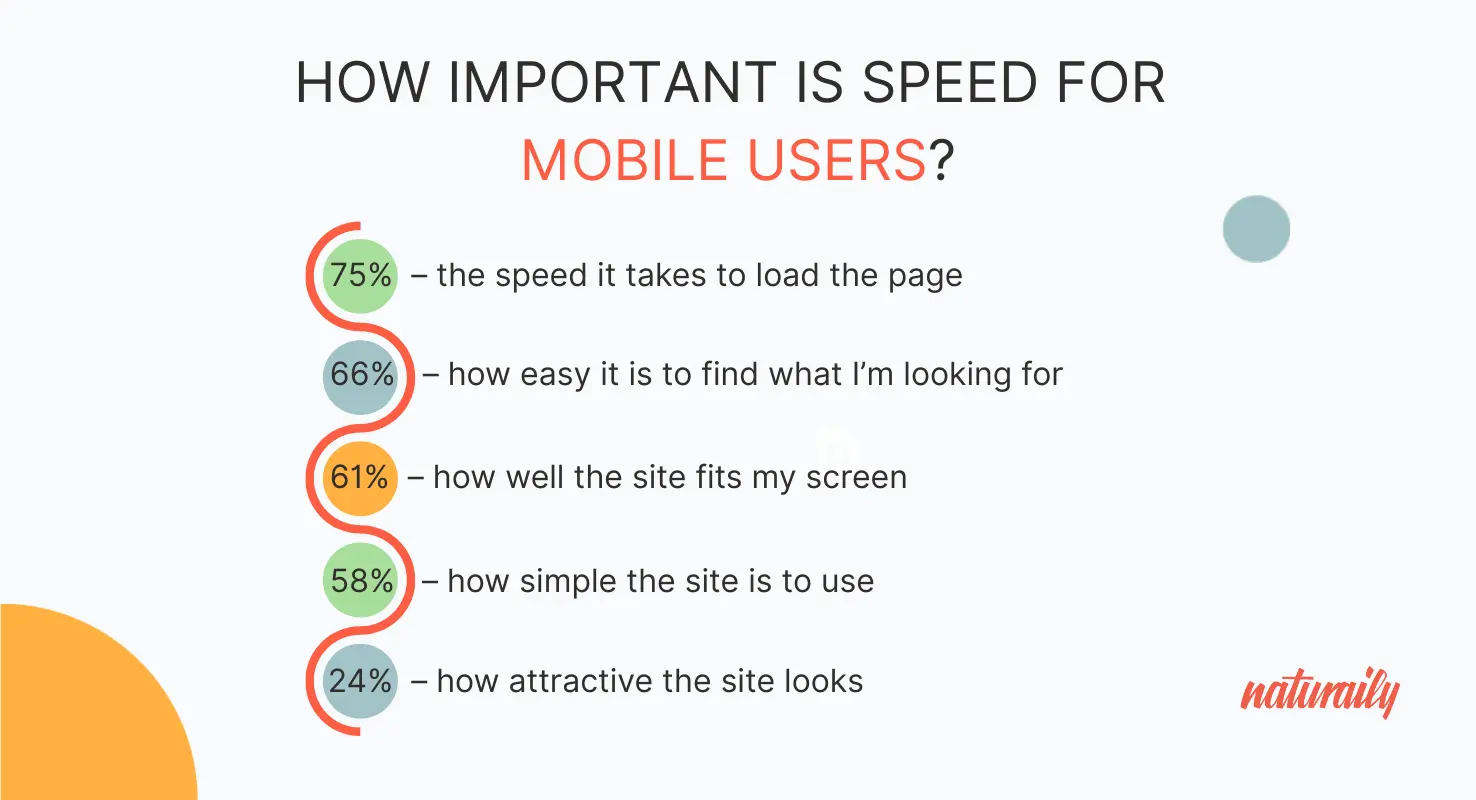
Data source: Brain Food for Digital Creatives, Report
How to optimize Core Web Vitals for mobile
Here are examples of targeted strategies:
Adaptive images. Serve smaller, device-appropriate images using responsive <img srcset> or modern formats like WebP/AVIF.
Mobile-first prioritization. Load above-the-fold content first; defer secondary scripts and media.
AMP or lightweight frameworks. Consider Accelerated Mobile Pages (AMP) or frameworks optimized for mobile delivery if speed is mission-critical.
Touch-friendly interactions. Ensure buttons and CTAs are large enough and react instantly to taps (improving INP).
Connection-aware loading. Use service workers or adaptive loading to reduce assets when users are on 3G/4G.
Core Web Vitals for E-commerce Storefronts
In e-commerce, milliseconds turn into revenue. The pages where Core Web Vitals matter most are also the pages closest to the sale, so it helps to look at performance template by template.
Collection and product listing pages. These are image-heavy and often use infinite scroll or filtering, which strains LCP and CLS. Lazy-load below-the-fold products and reserve space for images so the grid does not jump as it loads.
Product detail pages. LCP usually depends on the main product image, and INP depends on how quickly variant selectors and the "Add to Cart" button respond. Both are make-or-break moments for conversion.
Cart and checkout. Dynamically injected fields, shipping calculators, and payment widgets are common sources of layout shift and input delay. Stabilizing them protects you at the exact point where customers decide to complete the purchase.
This is the kind of work behind the Nanobebe results above: an 80%+ reduction in Total Blocking Time and a smoother shopping journey across the catalog. For storefronts on Shopify and Shopify Plus, performance gains here translate directly into fewer abandoned carts and more completed checkouts.
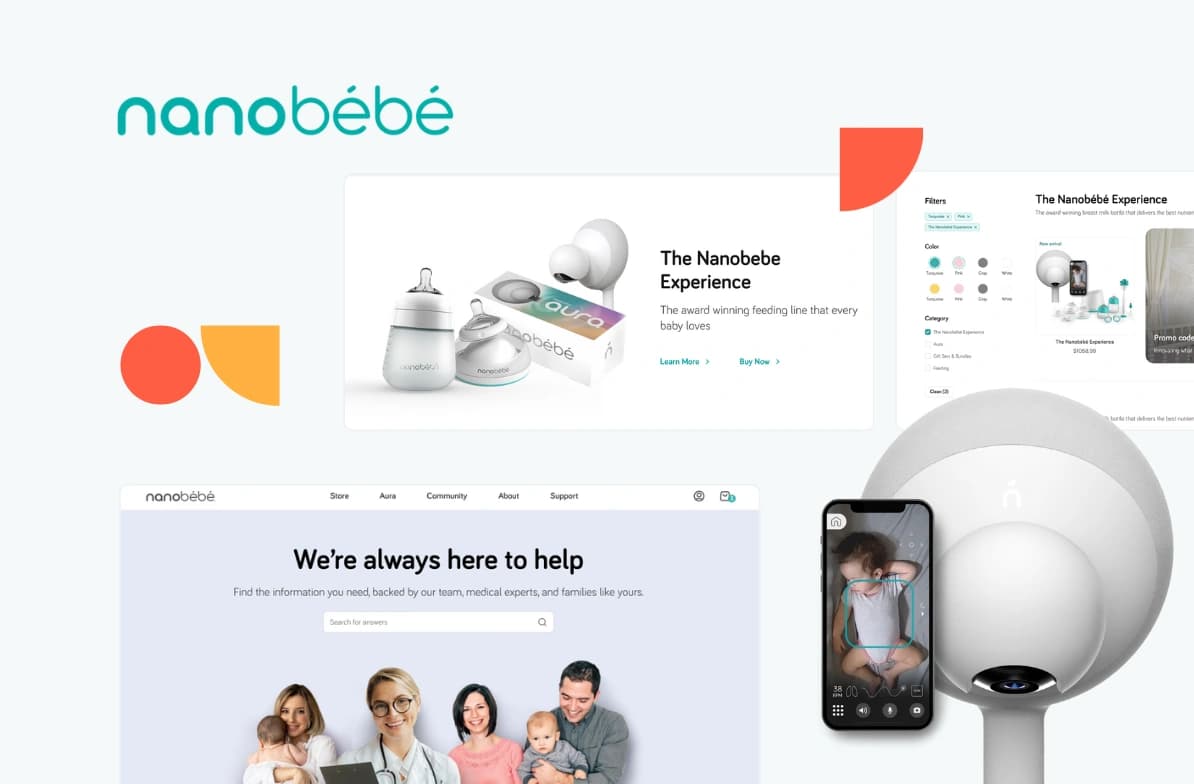
Nanobébé needed a modern, high-converting store to match their global growth. We rebuilt their Shopify site with sleek UX and faster load times. This made shopping easier and more engaging for parents worldwide.
5/5
Clutch review
117%
increased performance
80%
reduced TBT
Why Next.js and Hydrogen Are the Smart Choice to Optimize Core Web Vitals
Solutions such as headless commerce, Next.js, and Shopify Hydrogen give business owners the confidence that their websites can handle growth without slowing down. They provide faster loading times, stronger Core Web Vitals optimization, and the flexibility to easily introduce new products or expand into new markets. A site built on these technologies also performs better in search engines, helping you attract more visitors and turn them into customers.
Next.js is performance-first by design. Hybrid rendering (SSG, ISR, and SSR) improves LCP, React Server Components and streaming improve INP, and built-in image optimization, edge runtime, caching, and prefetching keep the experience fast. It suits complex catalogs and projects that need full control over UX.
Shopify Hydrogen is headless React with built-in commerce tools, server components, streaming, smart API caching, and Oxygen hosting. It is a strong fit for Shopify brands that want speed and scalability with native workflows.
Native Shopify offers a fast CDN, optimized checkout, and theme sections for quick launches. Performance then depends on lean apps and disciplined media and code practices, which makes it a good choice for small teams focused on speed to market.
With our expertise, brands gain websites designed to grow alongside their business. Enhancements in speed, scalability, and user experience lead to higher conversions and stronger long-term results, helping you stay competitive.
Core Web Vitals Before and After a Website Redesign
Sometimes optimization gets you most of the way, and the rest is blocked by the platform itself. It helps to be honest about which situation you are in.
Optimization is enough. If the foundation is sound, targeted work moves the needle: script cleanup, image optimization, caching, lazy loading, and removing unused third-party code. Most sites see real gains here without rebuilding anything.
A redesign is needed. When the frontend is outdated, technical debt has piled up, or mobile UX problems cannot be solved with incremental fixes, a redesign is the more effective route. It also gives you a clean opportunity to rebuild for performance from the start.
Replatforming is needed. When a legacy CMS or a monolithic stack caps performance no matter what you tune, moving to a modern, headless architecture is the only way to break the ceiling.
If a redesign is on the table, two things matter most: knowing what it will cost and protecting the SEO you have already earned. We cover both in Website redesign cost and timeline and How to redesign a website without losing rankings or leads.
Core Web Vitals Optimization Services: When to Bring In Expert Help
Many teams can handle the basics in-house. The point where professional help pays off is when performance problems start costing you traffic or revenue and the fixes are no longer obvious. A focused engagement usually covers a performance audit, frontend optimization, Core Web Vitals remediation, an architecture review, and e-commerce performance work.
When should you hire a website speed consultant?
It is worth bringing in a website speed consultant or development partner when:
Your site keeps failing Core Web Vitals despite previous optimization efforts.
Traffic growth has stalled or started slipping.
Conversion rates are declining, especially on mobile.
Your storefront feels slow and it is affecting checkout completion.
You are planning a redesign or a replatforming project.
Your team does not have dedicated performance expertise.
Platform limitations are blocking further gains.
An independent technical assessment often surfaces the highest-impact fixes quickly and helps you prioritize where to invest first.
Ready to Build a Faster, Scalable Website?
Core Web Vitals directly affect how easily people find your site, how they interact with it, and whether they decide to buy. A fast, stable, and responsive website builds trust and drives more conversions.
If your pages are falling short, you may already be losing sales and search visibility. The right improvements can quickly change that.
At Naturaily, we help brands like n8n and Nanobebe transform performance into measurable growth. With our expertise in Next.js, Hydrogen, headless Shopify, and other modern technologies, we can help you achieve the same.
Contact us and let’s build a performance-first website together.
FAQ
Questions and Answers
A site that loads fast, responds instantly, and stays visually stable removes friction from critical moments like product browsing and checkout. For e-commerce brands, optimizing LCP, INP, and CLS means smoother product discovery, faster “Add to Cart” clicks, and fewer checkout drop-offs. In practice, better Core Web Vitals means higher trust, stronger engagement, and measurable revenue growth.
Yes. Core Web Vitals are part of Google’s official ranking signals, meaning sites that perform well on speed, responsiveness, and stability have an edge in search results. When two pages offer equally strong content, the faster, smoother one typically ranks higher.
If you have already compressed images, trimmed scripts, and added caching but still fail Core Web Vitals, the cause is usually structural rather than cosmetic. A legacy CMS, a heavy theme, or a frontend with no rendering strategy will cap your performance no matter how much you tune around the edges. At that point, a redesign or a move to a headless architecture is what unlocks the next level of speed.
Next.js – Performance-first: hybrid rendering (SSG/ISR/SSR) for LCP, React Server Components + streaming for INP, built-in image optimization, Edge Runtime, caching, and prefetching. Best for complex catalogs and full UX control.
Shopify Hydrogen – Headless React with built-in commerce tools, RSC + streaming, smart API caching, and Oxygen hosting. Great for Shopify brands seeking speed and scalability with native workflows.
Native Shopify – Fast CDN, optimized checkout, and theme sections for quick launches. Performance depends on lean apps/themes and disciplined media/code practices. Best for small teams and speed-to-market.
When to choose:
Next.js → Maximum flexibility & complex catalogs.
Hydrogen → Shopify brands going headless with scalability.
Native Shopify → Quick, simple launches with minimal dev overhead.
In 2026, online stores should aim to achieve Google's "good" Core Web Vitals thresholds: LCP ≤ 2.5s, INP ≤ 200ms, and CLS ≤ 0.1. These metrics measure loading speed, interactivity, and visual stability—three factors that directly affect user experience, SEO visibility, and ecommerce conversions. As competition increases and customer expectations for fast digital experiences continue to rise, maintaining strong Core Web Vitals remains a key part of website performance optimization.
Get a Core Web Vitals & storefront performance audit
A professional performance audit identifies the technical bottlenecks affecting your SEO, user experience, and conversions.