The 4 CMS Pain Clusters We See in 2026 (Signals + What to Measure)
Your website can be “fine” on the surface, and still quietly drain pipeline every day. In our 2025-2026 buyer interviews and delivery work, four CMS pain clusters show up repeatedly. The quotable part is the distribution: 87.5% / 62.5% / 50% / 25% across the four clusters. So we see a pattern.


If you recognize one of these clusters, you’re not looking at a “website refresh” problem, but a platform constraint: the CMS and architecture shape how fast you ship, how consistent your brand feels, how safe your data is, and how well your content scales across channels.
This post gives you:
the signals that tell you which cluster you’re in,
the KPIs to measure (so this doesn’t become an opinion fight),
and a Pain cluster diagnostic worksheet you can turn into a lead magnet.
CMS pain clusters (definition):
A CMS pain cluster is a repeatable set of business symptoms (speed, scaling, governance, risk) caused by an aging CMS + architecture, so fixing a single page, plugin, or SEO tactic won’t solve it. You fix the cluster by fixing the platform.
From Naturaily’s sample, these four clusters appeared again and again:
Outdated technology, poor UX, and brand damage - 87.5%
Scalability, multichannel delivery, and future-proofing - 62.5%
Lack of marketing agility and developer dependency - 50%
Security, compliance, and data integrity risks - 25% as a primary driver (but present in most discussions)
Cluster 1: Outdated Technology, Poor UX, and Brand Damage (87.5%)
Companies describe their websites as “fatal,” “tragic,” or “legacy,” sometimes “feeling like it’s from 20 years ago.” Under the hood, it’s often static PHP/HTML, plugin-bloated WordPress, or aging custom code nobody wants to touch.
Signals to watch (fast self-check)
If you hear 2-3 of these weekly, you’re in Cluster 1:
“We can’t hit our Core Web Vitals targets.”
“Designs don’t match the brand anymore; every page looks different.”
“Small content changes require developer time.”
What to measure (KPIs)
You want business-facing metrics and technical metrics, on the same dashboard.
Experience + performance
Core Web Vitals: LCP, INP, CLS (track by template: homepage, category, PDP, pricing, blog).
Conversion rate on high-intent templates (pricing, demo, checkout)
Bounce rate + engagement by landing page
Paid efficiency: cost per lead / acquisition (paired with landing page speed)
Brand consistency
Component adherence rate: % pages built from approved components vs one-off blocks
Design drift incidents: # times teams “fix it locally” instead of in a system
Content rework rate: edits or QA cycles per page before publish
“Good” targets
Use Google’s CWV guidance as a baseline and set template-specific goals.
What usually fixes this cluster
Not “a redesign sprint.” Usually:
structured content,
governed components + preview workflows,
performance-by-design (media pipeline, caching, ISR/SSG where it fits).
Real example:
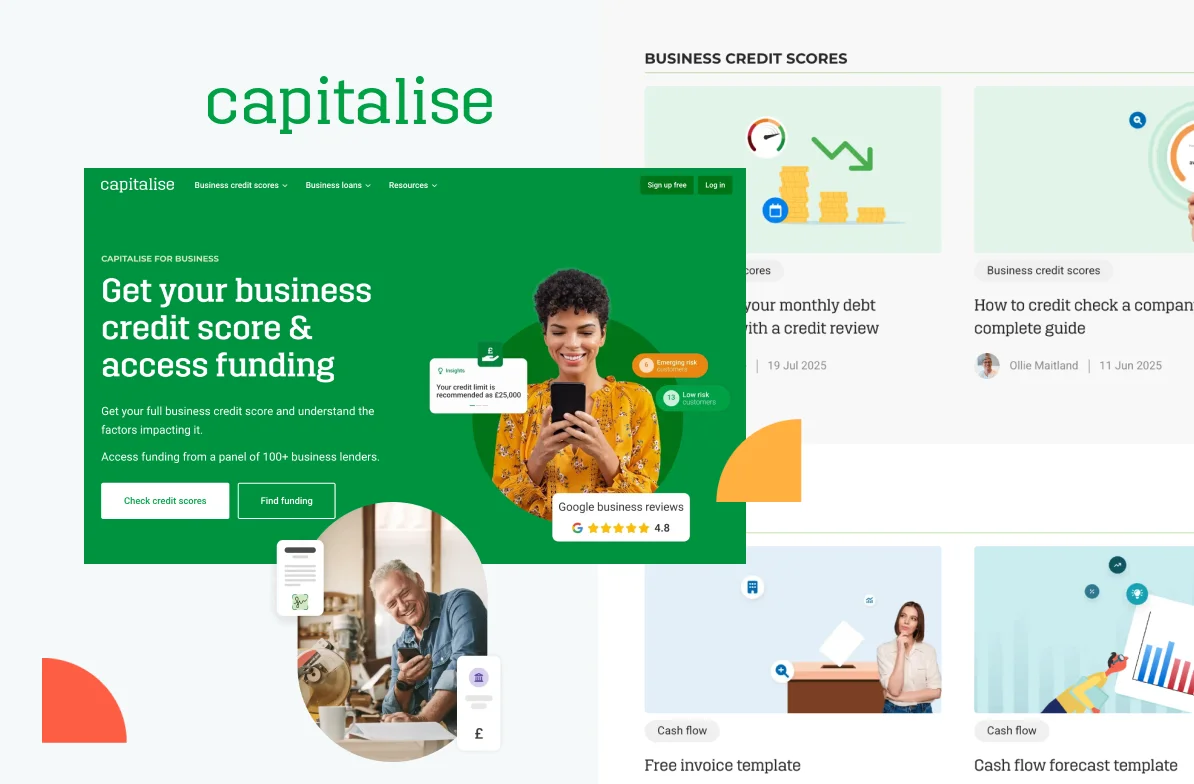
Capitalise saw +31% faster mobile LCP and +48% growth in average monthly traffic after replatforming to a headless, experimentation-ready stack.
Capitalise needed a modern website to replace their rigid legacy CMS and enable data-driven growth. We created a fast, headless platform with built-in A/B testing. Easy to experiment, optimize, and boost conversions.
48%
growth in average monthly traffic
31%
faster mobile LCP
35%
faster CMS content update
Cluster 2: Scalability, Multichannel Delivery, and Future-Proofing (62.5%)
The core problem
Content is trapped in page templates, so every new channel means copy/paste, extra editorial overhead, and inconsistency.
Teams want to reuse content across:
website & blog
portals
mobile apps & devices
partner portals, chatbots, internal tools
And yes, AI + search shifts are part of the brief: companies want systems prepared for AI and the increasing relevance of ChatGPT/LLMs in search.
Signals to watch
“We copy-paste the same content into multiple places.”
“Each region/brand rolls their own way of doing things.”
“Every new channel needs a separate content team.”
What to measure (KPIs)
Content operations
Reuse rate: % of content used in 2+ channels
Lead time to add a new locale/brand
Cost per translated page (and drift rate between locales)
Channel scalability
of “sources of truth” for the same entity (product, feature, policy)
% content with structured fields vs page-only HTML blobs
AI/search readiness
Google’s guidance on AI features emphasizes that there’s no separate “AI optimization” trick - quality, accessibility, and clear structure still matter. Use that as your north star, then track outcomes.
Track:
branded search demand trends
organic entrances to deep pages (guides, docs, comparisons)
assisted conversions originating from informational pages
What usually fixes this cluster
structured content models (types/blocks/relations)
localization workflows (translation memory, diffs, fallbacks)
API-first delivery so content can serve web/app/portal/assistant outputs
Cluster 3: Marketing Agility and Developer Dependency (50%)
What it sounds like
“A simple landing page takes two sprints.”
“We avoid experiments because they’re disruptive.”
“We can’t preview like we need to.”
This cluster is where growth stalls quietly: fewer campaigns, fewer tests, fewer learnings.
TTLP (Time-to-Launch Page):
The median time from “we need this page” to “it’s live,” including content, design, build, QA, and approvals.
What to measure (KPIs)
Velocity
TTLP ↓ (median, not best-case)
% changes shipped without dev involvement ↑
# marketing experiments/month (A/B tests, landing page variants, CRO iterations)
Engineering load
dev hours spent on content tickets (baseline → monthly)
queue time for “simple changes”
What usually fixes this cluster
visual editing + governed components + real preview
approvals + rollback so teams can move fast without breaking trust
Cluster 4: Security, Compliance, and Data Integrity Risks (25% Primary Driver, Present in Most)
What it sounds like
ISO 27001 / SOC 2 audits are painful
plugins conflict, break on upgrades, and expand the attack surface
marketing tools create “un-auditable data flows” and internal conflict
What to measure (KPIs)
Risk + governance
Plugin/vendor count (especially “unknown” add-ons) ↓
Time to security approval for new tools/features ↓
# audit findings related to content/platform (trend line)
RBAC/SSO coverage: % of tools integrated with SSO; % of roles reviewed quarterly
If you want a credibility anchor for governance language, NIST’s security controls are a safe reference point for organizations that need strong audit + access control practices.
What usually fixes this cluster
fewer plugins, more owned integrations
SSO/RBAC + audit logs by default
self-hosting or region-locked cloud if residency is non-negotiable
The Measurement Stack (What Tools, Where to Look)
If you want leadership buy-in, don’t report “we improved LCP.” Tie it to the KPI chain:
Business: conversion rate, MQL→SQL, engagement
Content ops: TTLP, reuse rate, error rate
DevOps/IT: CWV, maintenance hours, deployment frequency
Where to measure
Core Web Vitals: Google Search Console + CrUX/PageSpeed (by template)
Velocity (TTLP): your ticketing system + publishing logs (median TTLP)
Reuse rate: content inventory + tagging (count “used in channels ≥2”)
Security posture: vendor inventory + approvals cycle time + audit outcomes
What Most Teams Get Wrong (And How to Avoid a Costly Detour)
The report’s value is that it doesn’t treat CMS selection like a popularity contest. It treats it like a measurable business decision: diagnose the cluster, baseline the numbers, and only then choose the architecture and vendor that actually removes the constraint.
If you skip the diagnosis step, you usually end up with one of two outcomes:
you buy a CMS that looks good in demos but doesn’t change TTLP, reuse rate, or governance friction, or
you overbuild a platform that’s too complex for your team to operate.
The good news: you can avoid both with a simple measurement-first approach.
The “One Slide” Diagnostic You Can Run This Week
If I had to walk into a packed auditorium and give one instruction everyone can follow, it’s this:
Stop asking “Which CMS should we choose?” and start asking “Which constraint is costing us the most right now?”
Then measure it.
Use this as your baseline slide:
Cluster 1: UX / performance / brand - Core Web Vitals + conversion on money pages
Cluster 2: Scale / multichannel - reuse rate + localization cost + lead time to add a locale
Cluster 3: Agility - TTLP + % changes shipped without dev + experiments/month
Cluster 4: Security / compliance - plugin/vendor count + security approval time + audit friction
If you can baseline these in one session, you’ve already done what most companies postpone for months: you’ve turned “we feel stuck” into a map of where the business is actually bleeding time and money.
What “Good” Looks Like (And Why It’s Not The Same For Everyone)
A useful CMS strategy isn’t “headless vs traditional.” It’s not even “best CMS in 2026. It’s fit-for-purpose.
A few examples of what “good” might mean depending on your cluster:
If you’re in Cluster 3 (agility), “good” means marketing can ship new pages fast, without dev bottlenecks, and still stay within brand guardrails and approvals.
If you’re in Cluster 2 (scale/multichannel), “good” means the same structured content powers your site, your app, and your portals, without copy/paste and content drift, and localization doesn’t feel like a second product.
If you’re in Cluster 4 (security/compliance), “good” means audits are boring, plugins are intentional, access is controlled by default (SSO/RBAC), and you can always answer the question: “who changed what, when?”
The report helps you match “good” to your reality by turning it into capabilities, trade-offs, and KPIs, so your team stops arguing in abstractions.
What You’ll Get in The Full Report (And Who It’s For)
If this article gave you the “why” and the “what,” the report gives you the “how.”
Inside the CMS for Modern Web in 2026, you’ll find:
a deeper breakdown of the 4 pain clusters and how they show up across industries,
practical guidance on aligning stakeholders and defining requirements,
a structured selection approach (not just vendor opinions), and
KPI-driven thinking so you can build a business case leadership will trust.
This report is for you if:
your website is a growth channel and you feel it’s slowing you down,
you’re considering headless / composable / hybrid-headless and want clarity,
you need a measurable plan - TTLP, CWV, reuse rate, governance, not another brainstorm.
Do This Next
If you remember one thing from this post, make it this:
A CMS change only pays off when it removes your biggest constraint.
So don’t start with vendors. Start with a baseline:
pick your top 3–5 “money pages,”
measure the KPIs tied to your pain cluster(s),
and use those numbers to guide architecture and selection.
Then download the report and use it as your decision playbook.
Need support when choosing the right CMS for your business? Contact us, we’re happy to help!
Make your CMS decision with numbers, not opinions
Download the 2026 report and map your pain cluster to KPIs, capabilities, and the right modernization path.